




What Is a Receipt?
A receipt is a record of a transaction between two or more parties. It outlines the purchase details and includes information like the purchase price, date, and payment method. Among main purposes:
- Prove that a buyer made a purchase.
- Show the owner of a warranty that came with the item.
- Enable the return of a product.
- Have for a company’s tax and accounting records.
It lets you effectively track your purchases or sales and provides evidence in case of a future dispute about the purchase.
Receipt vs. Invoice
- Purpose: A receipt acknowledges that the buyer paid and signals that the transaction has been completed. It acts as proof of purchase for the buyer. An invoice requests payment from the buyer for the services or goods the seller provided.
- Details Included: These documents include similar information, such as the goods/services rendered, the date, and the cost. An invoice will include the due date and the seller’s contact information, while a receipt will include the payment method the buyer used to complete the transaction.
- Timing: A seller distributes an invoice before payment, while they distribute a receipt after payment.
How to Write a Receipt
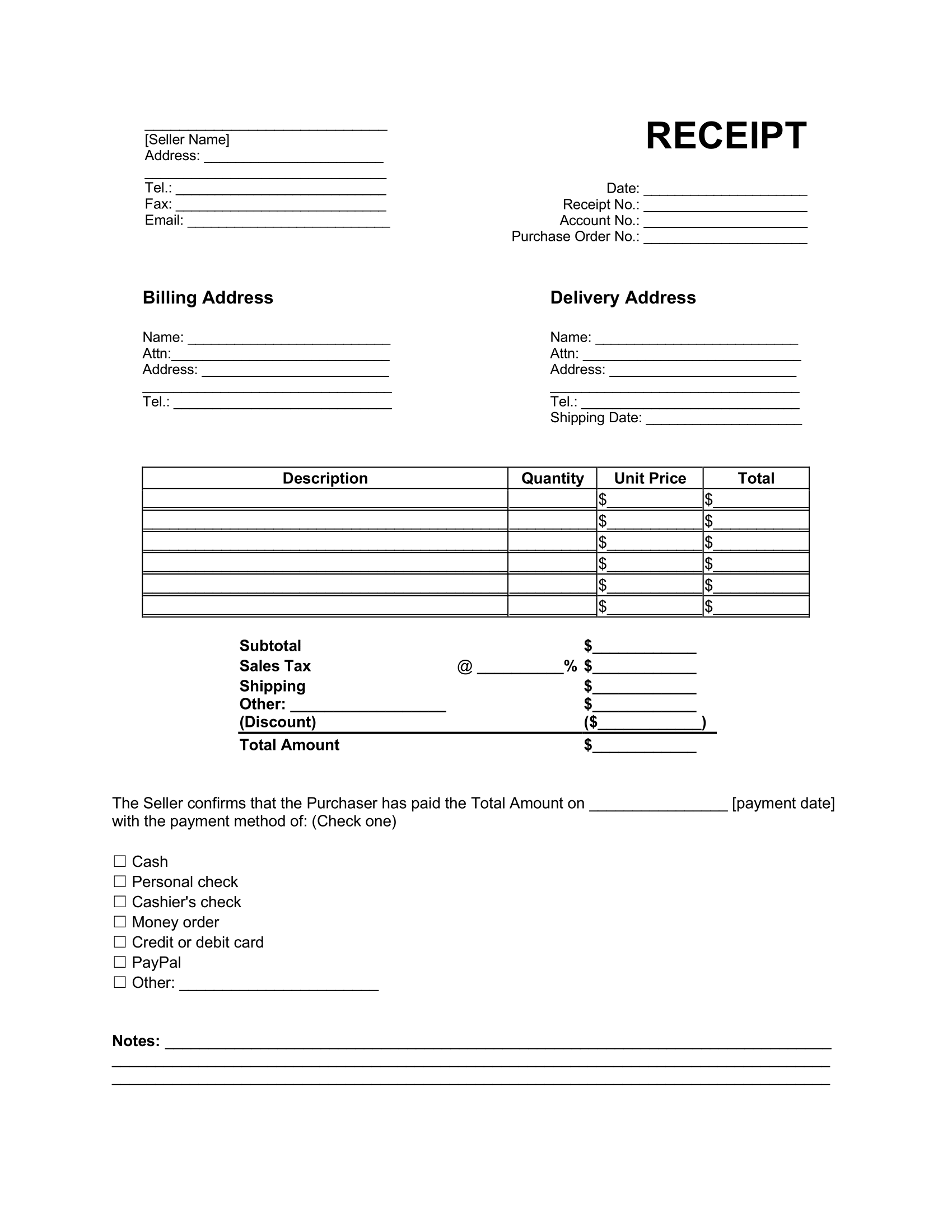
Step 1 – Record the Date
Recording the date when the transaction occurred can help ensure you have the proper evidence if a dispute arises. For example, you can confirm a buyer’s right to return an item within a certain number of days.
Step 2 – Designate a Receipt Number
It should have a unique identifying number to help separate it from other transactions. This is especially important when receipts look identical or similar between customers.
Step 3 – Include the Account Number and Purchase Order Number
If a customer on a transaction has an identifying account number, include it on the document.
If it is for a transaction that fulfills a purchase order, you should also include that purchase order number.
Step 4 – Record the Seller’s Contact Information
Include the following identifying contact information for the seller:
- Name
- Business address
- Telephone number
- Fax number
- Other contact information, if applicable
Step 5 – Write the Billing Address and Delivery Address
Write the customer’s name, address, and telephone number.
There should also be a separate section for a delivery address, as the customer may want the business to deliver the product to a location different from the one on the billing address.
Step 6 – Provide a Description of Goods or Services
Include a description of the goods or services rendered to the customer. The description of goods should be sufficient to identify what the customer purchased. It should also include essential information such as the following:
- The quantity of particular goods sold
- The unit price for each good
- The total cost of the goods sold
You can also include a subtotal, sales tax information, relevant discounts, and shipping costs. Accounting for all these costs and fees lets you determine the total amount the customer owes.
Step 7 – Explain the Receipt of Payment
Indicate how much money the seller received. The total amount should identify the date it was paid and the method of payment, such as:
- Cash
- Check
- Money order
- Credit or debit card
- Mobile payment service
How to Scan a Receipt
You can scan paper documents in one of two ways. The first is to use a designated mobile app, which allows you to capture an image and convert it to your desired file type.
The second way is to use a physical scanner to save the image to your computer. From here, you can also convert the image to your desired file type.