What Is a Workplace Incident Report Form?
A workplace incident report form summarizes an injury, security breach, violence, or health and safety hazard that occurs at work. It covers what happened in the workplace, who was involved, and how to proceed.
HR personnel create and maintain workplace incident reports. With proper training, they follow legal and internal reporting requirements to increase transparency. Their documentation promotes safety and helps identify areas for improvement.
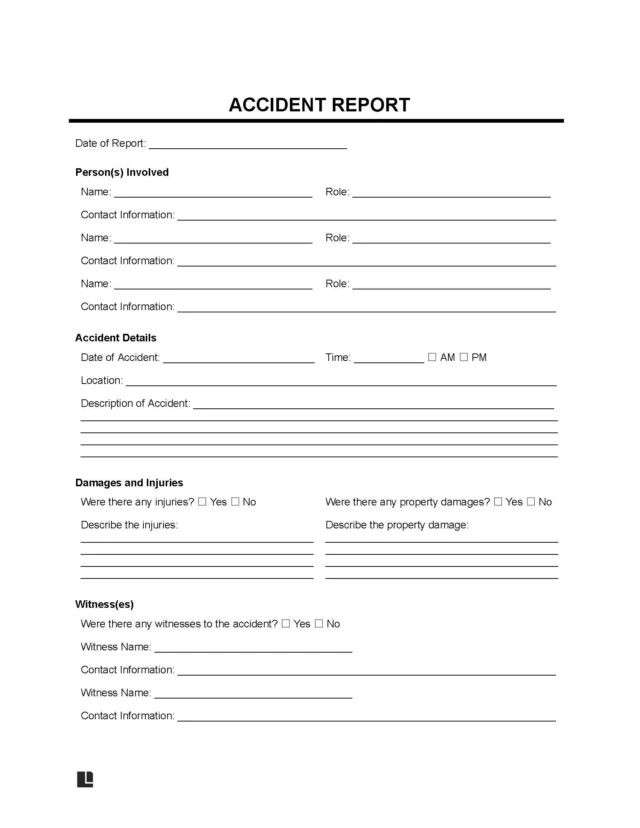
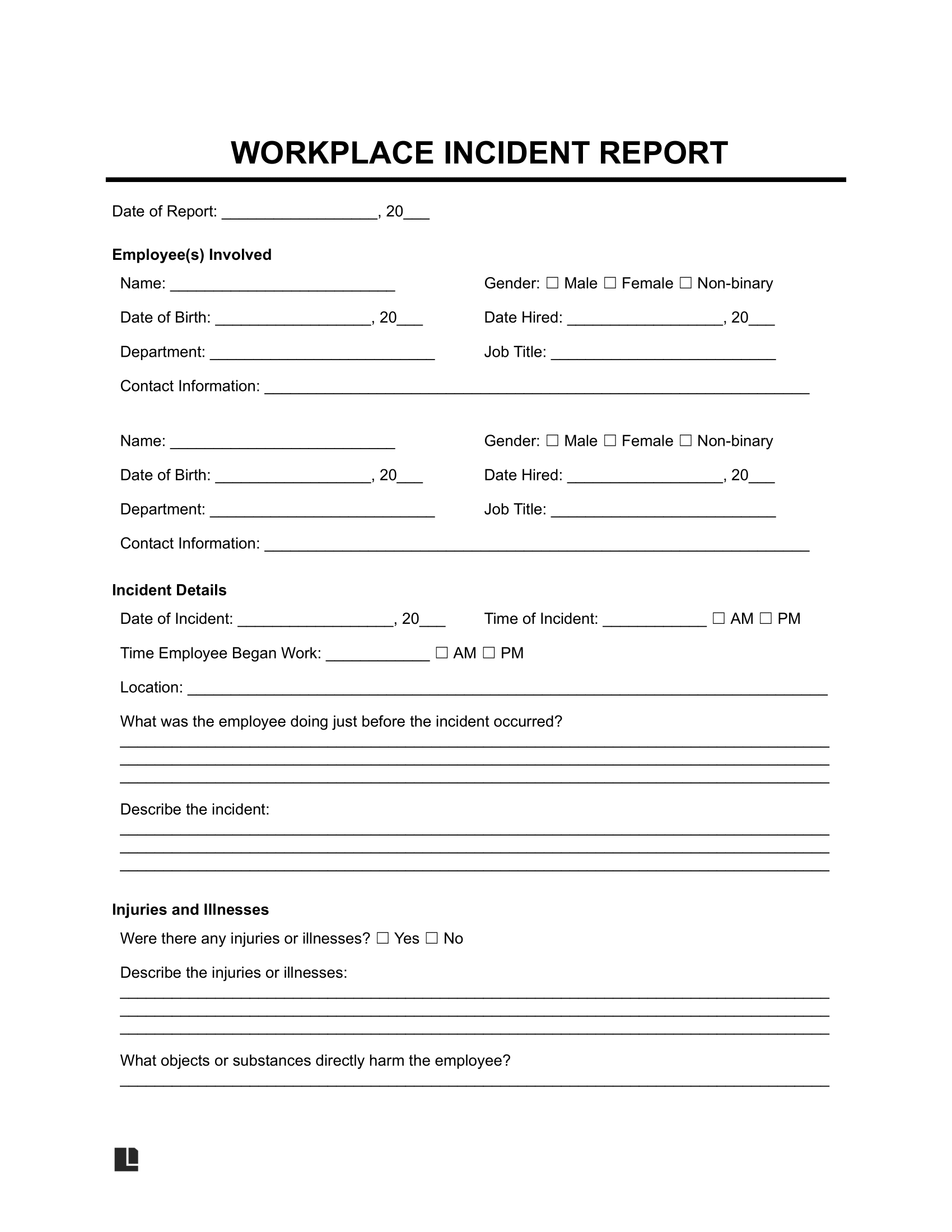
Our workplace incident report template makes reporting simple. It ensures your document includes the essential details and is easy to reference.
A workplace incident report covers accidents in the workplace at large. If you need to document issues with one employee’s behavior, consider using an employee incident report form instead.
Why Is It Important to Report Incidents in the Workplace?
Reporting incidents in the workplace provides the following benefits:
- Identifies unsafe conditions
- Helps prevent future incidents
- Ensures prompt medical care if needed (by creating an official record for insurance)
- Maintains legal compliance with OSHA and other requirements
- Fosters a workplace culture of safety and accountability
- Improves employee morale by implementing clear processes
How to Write a Workplace Incident Report
Writing a workplace incident report helps create a transparent work environment where individuals take responsibility for their actions rather than concealing problems. Below are the steps involved in writing a workplace incident report to help you get started.
Step 1 – Name the Parties Involved
Identify yourself as the person reporting the incident and state your role. Also, name the employees involved in the workplace incident, providing the following information so they can be identified and contacted in a later investigation if needed:
- Full name
- Gender
- Date of birth
- Date hired
- Department
- Job title
- Contact information
If any third parties, such as customers or vendors, were involved, be sure to identify them as well.
If you have time, consider contacting the employee’s emergency contact. You can find this information on their emergency contact forms or employee information forms. If you don’t already have these forms from your employees, have them fill them out once things settle down so you’re prepared for future emergencies.
Step 2 – Give the Workplace Incident Details
Give the date and time of the incident as close to your knowledge. Specify the type of incident, whether it was an injury, property damage, environmental issue, near miss, or vehicle accident. When you use our template, you can choose from one of these pre-written options or write your own to better describe the situation.
As you describe the incident, maintain a neutral perspective. Only provide observable facts; statements like “The employee was being careless” can amount to an admission of fact and be used against the company in court.
You should also be aware of privacy concerns in certain cases. 29 CFR § 1904.29(b)(7) requires you to redact the employee’s name for cases involving sensitive matters, including injuries resulting from sexual assault or serious infectious diseases. Oftentimes, for cases like these, the employee’s name can only be unredacted when the form is shared with the employee themselves or with government officials.
You should also give the location of the incident, including the property address and specific site. For example, you can provide your company’s office address and specify that the incident occurred in the break room on the third floor.
If the incident violated a company policy, cite it in your description.
Step 3 – Describe the Property Damage and Injuries
Indicate whether the parties involved sustained an injury. If they did, specify the type of injury and affected body part. You can also explain the medical treatment provided, if applicable.
Clarify if there was any property damage. If there was, describe the extent of the damage and give an estimated cost to repair it.
Step 4 – Name Witnesses
Name witnesses who saw the workplace incident firsthand. List their names, phone numbers, and emails. This way, your HR department or local authorities can contact them for further details.
Step 5 – Discuss Other Actions Taken
Explain what actions you or other witnesses took during the incident. Examples include the following:
- The police were called.
- The affected area was cordoned off.
- A witness administered CPR or first aid.
- A machine was shut off, a gas valve was closed, or a spill kit was used for a chemical leak.
- An “out-of-service” tag was placed on a piece of faulty equipment.
- The building was partially or fully evacuated.
- A supervisor secured specific physical items (like a broken ladder) for use in an investigation later.
Documenting all of the actions taken can help your HR department understand how the situation was contained. It can also provide context for the corrective actions taken and how they can improve workplace safety and prevent future issues.
Step 6 – Record Final Details
Give the name of the supervisor reviewing the report. Naming them holds them accountable and ensures they can vouch for the form’s accuracy. You should also provide the report date for accurate recordkeeping, which you can easily do in our guided form. Once you’ve recorded these final details, collect the employee’s and the supervisor’s signatures.
Workplace Incident Report Sample
View a sample of our workplace incident report template to see how to document an issue in the work environment. Our guided form helps you capture all the key details so you can use them to meet reporting requirements and update your company’s safety guidelines. Fill out yours with Legal Templates, then download copies in PDF or Word format.
How Does a Workplace Incident Report Help You Meet OSHA Requirements?
A workplace incident report is helpful for improving your company’s processes and preventing safety issues, but it’s also an important tool for legal compliance. Learn how a workplace incident report helps you meet OSHA reporting and recordkeeping requirements below.
Reporting to OSHA (For All Companies)
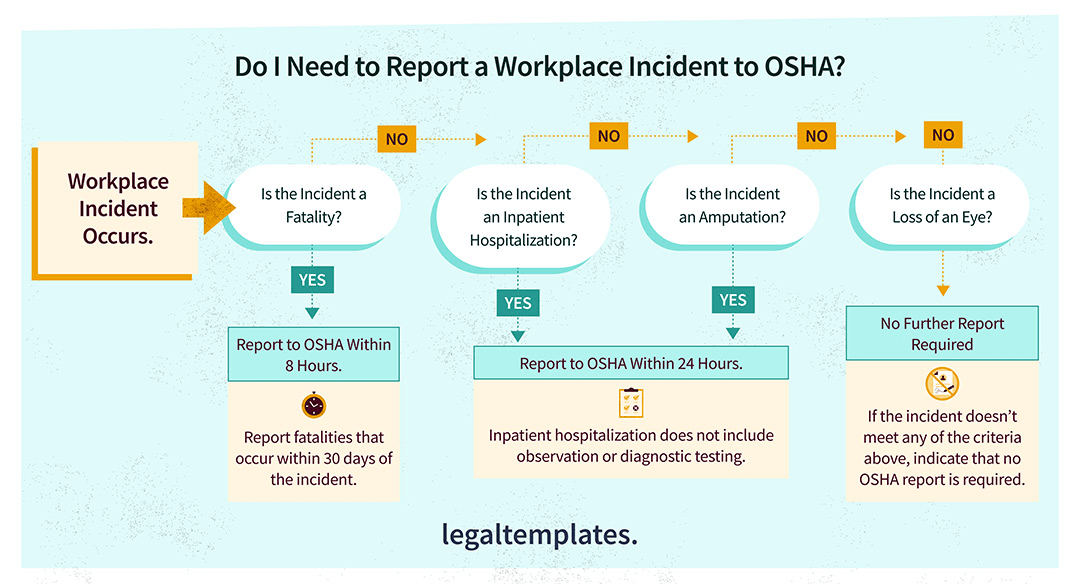
All companies under OSHA jurisdiction, regardless of size or industry, must report certain incidents to OSHA. 29 CFR 1904.39 requires the reporting of these specific incidents to OSHA within the stated timeframes:
- Fatalities: Within 8 hours of finding out.
- Inpatient hospitalizations: Within 24 hours of finding out (not for observations or diagnostic testing).
- Amputations: Within 24 hours of finding out.
- Loss of an eye: Within 24 hours of finding out.
What If the Reportable Event Does Not Occur During the Work-Related Incident?
If something happens at work and a reportable event isn’t obvious until symptoms arise later, reporting may not be required.
Fatalities must only be recorded to OSHA if they occur within 30 days of the work-related incident. For an inpatient hospitalization, amputation, or loss of an eye, it’s only required to report to OSHA if the event occurs within 24 hours of the work-related incident.
Recordkeeping (For Non-Exempt Companies)
OSHA requires direct and time-sensitive reporting of the most serious events, as discussed above. It also mandates recordkeeping for certain incidents in an OSHA 300 Log. Many companies must comply with these recordkeeping requirements, but some are exempt.
If your company had 10 or fewer employees during the last calendar year, you will generally be exempt from keeping the OSHA 300 Log. Businesses in low-risk industries, such as retail trade, finance, real estate, and insurance, are also usually exempt.
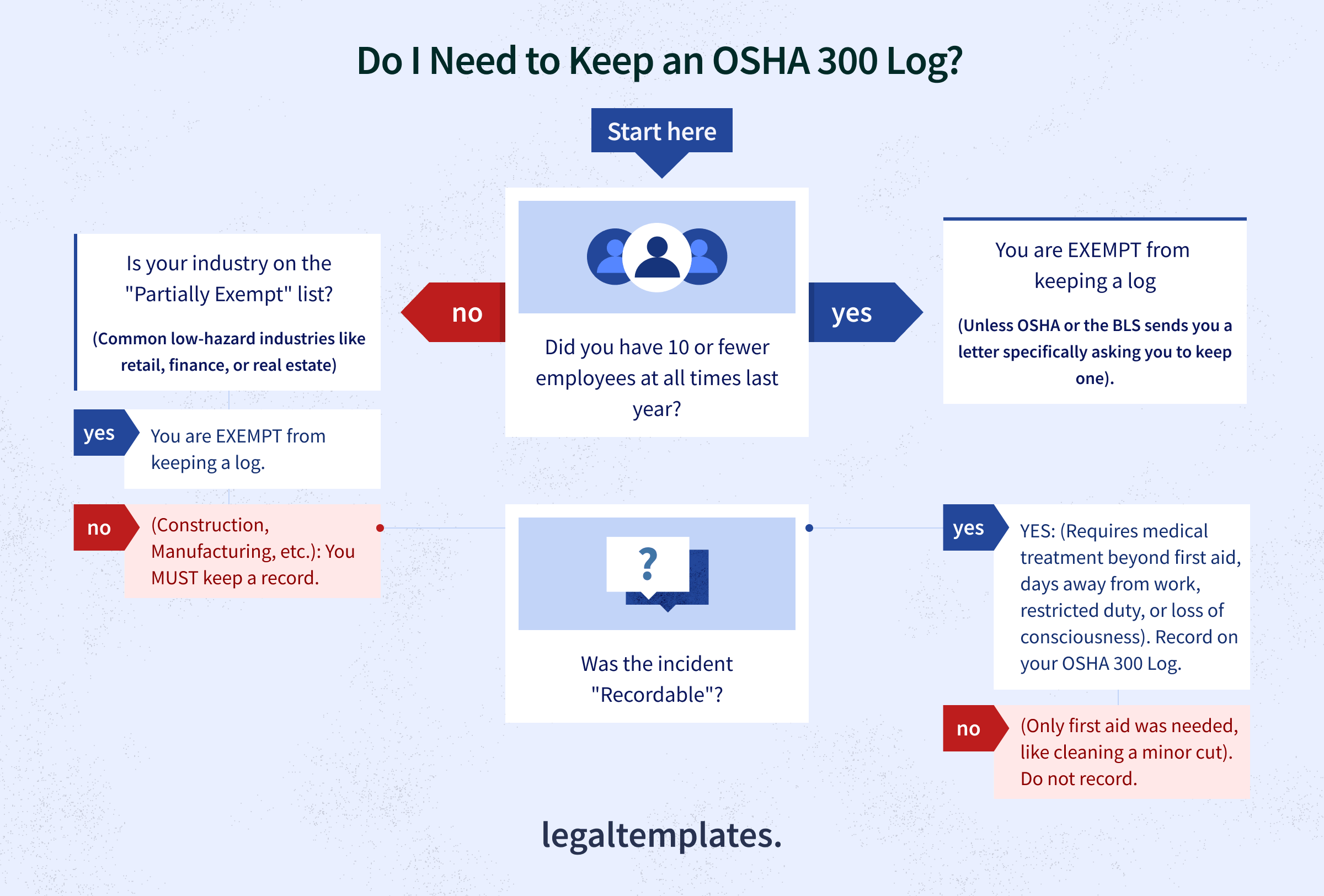
If you’re required to keep an OSHA 300 Log, you must record the following events resulting from a workplace incident, per 29 CFR 1904.7(a):
- Death
- Restricted work or transfer to another job
- Days away from work
- Medical treatment beyond first aid
- Loss of consciousness
- Diagnoses of punctured eardrums, cracked teeth, or fractured bones
- Diagnoses of chronic irreversible diseases and cancer
To ensure timely recording, 29 CFR 1904.29(b)(3) requires employers to enter recordable injuries or illnesses on the OSHA 300 Log within seven calendar days of learning about a recordable case. 29 CFR 1904.33(a) mandates that you retain all incident reports for five years.
You must keep the OSHA 300 Log on-site, but you do not have to submit it electronically if either of the following applies to you:
- You have 11 to 19 employees (regardless of your industry).
- You have 20 to 249 employees, but your industry is not on OSHA’s “High-Hazard” list (Appendix A).
In these cases, your only obligation is to post the 300A Summary on your office wall from February 1 to April 30 so your employees can see it.
Electronic Reporting Requirements
You only have to electronically submit your data by March 2 each year via the Injury Tracking Application (ITA) if the following conditions apply:
| Company Size | Industry Type | What You Must Send to OSHA |
|---|---|---|
| 20-249 Employees | High-Hazard (Appendix A) | Form 300A (Annual Summary) |
| 250+ Employees | Any non-exempt industry | Form 300A (Annual Summary) |
| 100+ Employees | Elite High-Hazard (Appendix B) | Forms 300, 301, and 300A (Full details) |
Note: Form 300A is just a summary of your 300 Log, while Form 301 provides detailed information about each individual, recordable workplace injury or illness.