What Is an End-User License Agreement (EULA)?
An end-user license agreement (EULA) is a contract between a software developer (the licensor) and a user (the licensee) who buys and uses the software. It grants the user the right to use the software, but they don’t obtain ownership. The developer keeps ownership rights under an EULA, but they can prevent the user from selling or leasing the software illegally.
An EULA is useful when a developer creates proprietary software and wants to make money by allowing others to use the program in limited ways. If the licensor worries about their copyright, an EULA can prevent others from copying the source code or transferring it to a non-paying user.
If you have created one of the following, you may benefit from writing an EULA for your users to agree to before using your product:
- Website
- Mobile app
- Software application
- Computer program
A software license agreement outlines the permissions and restrictions on using licensed software. It can prevent misuse, minimize disputes, and establish expectations. Without one, a user can modify, improve, enhance, or perform some other derivative of the original licensed software. These actions may result in stolen ideas or lost profits.
Regulating Other IP
If you want to limit the use of other IP besides software, use Legal Templates’s licensing agreement.
EULA vs. Terms & Conditions
An EULA details what users can and cannot do with a software product. It pertains to software installation and use. Meanwhile, the terms and conditions for a product cover a wider range of rules for usage and liability. Terms and conditions may include an EULA section.
| Factor | EULA | Terms & Conditions |
|---|---|---|
| Scope | Narrow (focuses on software licensing and usage rights) | Broad (covers overall product or service use, policies, and liabilities) |
| Purpose | Defines what users can and cannot do with the software | Sets general rules for using a website, app, or service |
| Application | Applies to software installation and use | Applies to users accessing or interacting with a platform or service |
| Can Include Each Other? | Sometimes forms a section within Terms & Conditions | Can include or reference an EULA for software components |
How to Write an End-User License Agreement
Writing an end-user license agreement helps you define user rights and limit your legal liability. Review the steps involved in writing one below.
Step 1 – Name the Software & the Licensor
Input the full name of the software being licensed. Also, add the name of the licensor, which is the party that owns the software. Including the licensor’s contact information is optional, but you should consider adding it to provide a clear channel for communication.
Step 2 – Give Information About the Grant of the License
When listing the licensee, you can name them specifically or grant the license to all users in general. If you plan to sell the software on a mass scale, it’s best to grant the license to all users for simplicity.
Specify the license’s duration. You can make it last perpetually or for a set period.
Also, list the details for the grant of your license, some of which include the following:
- The number of copies that can be installed and used
- Whether the licensee can use the software for business or personal use (or both)
- Whether the licensee has permission to make backup copies of the software
- Whether the licensee can reproduce or distribute copies of the software
- Whether the licensee can distribute the software as a standalone product or include it with another product
Avoid adding any red flags in your EULA that may alert or concern users. Be as clear and concise as possible, omitting confusing legal jargon.
Every EULA should clearly state that a revocable, non-exclusive, non-transferable, limited license is granted to the user. In other words, the software can be used but not resold.
Step 3 – Mention the Rights & Limitations
Clarify whether you will provide updates and maintenance at no additional cost. While optional, providing these upfront can be a good display of customer service, especially if you anticipate the software having regular updates.
You can also specify whether user support will be available for software users. If it is, describe the medium of support (phone, in-person, etc.), the hours support is available, and the amount of time support will be provided.
Step 4 – Provide Final Details
Finish your EULA with a few final clauses. One important one is the transferability clause, which explains whether the user can assign or transfer the license at any time, with prior notice, or not at all. You can also state the governing law, dispute resolution, and additional provisions if needed. Consider including any penalties or specific remedies for misuse of the licensed product.
Do the Parties Need to Sign an EULA?
No, the licensor and licensee don’t need to sign an EULA. However, the licensee should accept the terms before downloading, installing, and using the product.
The licensor can set up a clickwrap, requiring users to read and agree to the software usage terms before installation or use. If the user doesn’t agree, they are not allowed to download and use the software.
Other Terms in an EULA
Explore some other terms that are important in defining software usage terms in an EULA:
- Warranties: State whether the software comes “as-is,” or if you will make updates to ensure the user’s satisfaction.
- Limitation of liability: Clarify that you will not be responsible for any damages that result from the use of your software product.
- Severability: Explain that if one part of the EULA becomes unenforceable, it won’t render the rest of the agreement invalid.
- Termination: Declare what actions by the user will terminate the EULA and result in the revocation of the license. You can also state that you, as the licensor, have the right to suspend or terminate the license.
- Choice of law: Determine which state or federal laws will govern the agreement.
Sample EULA
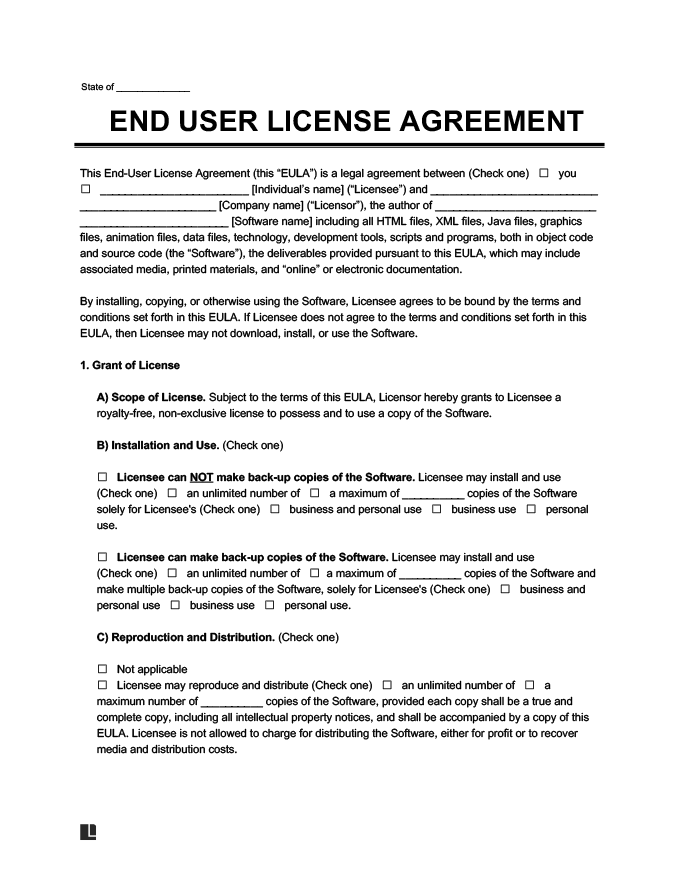
View our free sample end-user license agreement to learn how to grant a user the right to use your software. Then, create your own using our guided form, documenting your desired restrictions. Download the final copy as a PDF or Word file for distribution to users before they make a purchase.