What Is a Self-Proving Affidavit?
A self-proving affidavit is a sworn statement attached to a will that confirms the will was signed correctly. When a will includes one, the probate court can accept it without needing the witnesses to appear later and confirm the signing.
A self-proving affidavit is signed by the testator (the person making the will) and the witnesses, usually in front of a notary public. By signing it, everyone confirms a few key facts about how the will was executed. They confirm the identity of the testator and witnesses, that the witnesses saw the testator sign the will, and that the testator appeared to be of sound mind and not under pressure.
It’s usually written directly on the will or attached as a separate page with the notary’s seal. A will can still be valid without a self-proving affidavit, but many people choose to include one when signing their will.
How a Self-Proving Affidavit Helps Your Will
- Lets the court accept the will without calling witnesses
- Prevents delays if witnesses can’t be found years later
- Allows probate to proceed even if witnesses have moved away or died
- Serves as legal proof that the will was properly signed
Self-Proving Affidavit Laws by State
Self-proving affidavit rules vary by state. A few jurisdictions use different methods to prove a will. The table below breaks down the rules by state.
State
What's Required for a Self-Proving Affidavit?
Statute
Alabama
Testator and two witnesses sign a self-proving affidavit before a notary.
AL Code § 43-8-132
Alaska
Testator and two witnesses sign sworn affidavits before a notary or other authorized officer.
AK Stat § 13.12.504
Arizona
Testator and two witnesses sign a notarized self-proving affidavit.
AZ Rev Stat § 14-2504
Arkansas
Testator and two witnesses sign a self-proving affidavit before a notary.
AR Code § 28-25-106
California
Testator and witnesses may use affidavits or testimony to prove the will; a self-proving affidavit is not required.
CA Prob Code § 8220
Can I Add a Self-Proving Affidavit After Signing My Will?
Yes. In many states, you can add a self-proving affidavit after your will is signed. Instead of rewriting the will, the testator and original witnesses complete the affidavit separately and attach it to the existing will. The affidavit still must be signed before a notary. Some states explicitly allow an affidavit to be added later, including:
- Kansas
- New Jersey
- Oklahoma
- Texas
- Wisconsin
- Wyoming
Most statutes don’t set a specific deadline for adding the affidavit. However, it usually needs to be completed while the testator is still alive, since the testator and witnesses sign it before a notary. Fortunately, creating one is an easy process with Legal Templates. Simply add your details and download your self-proving affidavit.
If you need to change the terms of your will, consider using a codicil. A codicil lets you update parts of an existing will without rewriting the entire document.
How to Fill Out a Self-Proving Affidavit
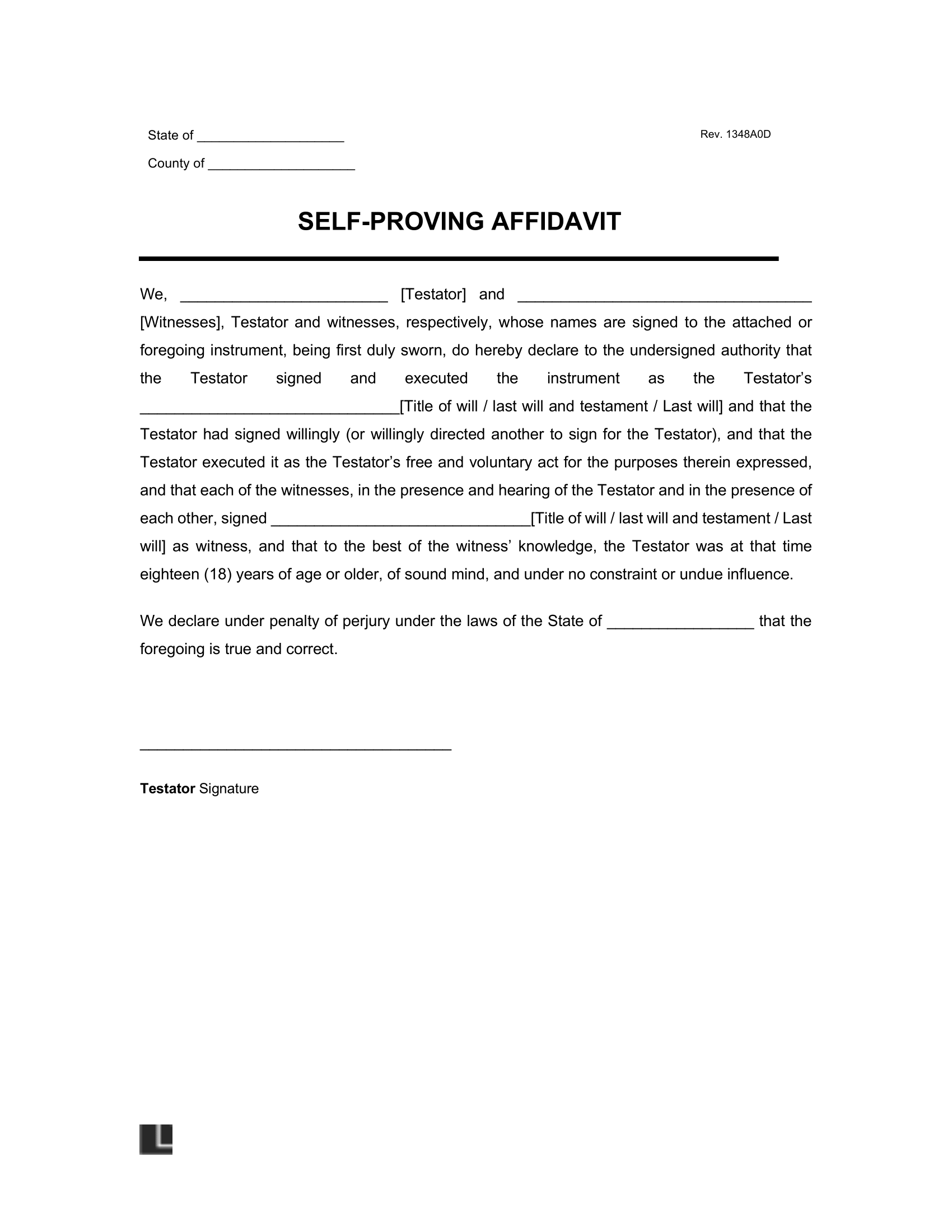
Most self-proving affidavits follow the same structure. You’ll enter basic information about the will, the testator, and the witnesses, then sign the document before a notary.
- Write the title of the will that the affidavit attaches to. Usually written as “Last Will and Testament of [testator’s name].”
- Enter the testator’s full legal name, exactly as it appears in the will.
- List the state where the testator lives and add the county.
- Include the full name and mailing address of the first witness who signed the will. Some forms allow the address to be filled in later.
- Include the full name and mailing address of the second witness who signed the will. The address may also be added later if needed.
- The testator and both witnesses sign the affidavit in front of a notary public.
- Attach the completed affidavit to the will.
After it’s signed and notarized, the affidavit stays with the will. When the will goes through probate, the court can use it as proof that the witnesses saw the will being signed.
Self-Proving Affidavit Sample
Review a completed self-proving affidavit to see how the document is structured. Then customize your own and download it in Word or PDF.