What Is a Social Security Change in Information Form?
A Social Security change in information form is a written notice you can send to the Social Security Administration (SSA) to report updates to your personal information. You may use it to report important changes to your personal or financial information, such as the following:
- A name change
- A new mailing address or phone number
- An updated email address
- A change to direct deposit or banking information
Keeping your information up to date helps you receive timely notices from the SSA. It also helps ensure your benefit payments go to the correct account.
How to Report Your Change In Information to SSA
You can report updates to the Social Security Administration (SSA) in several ways. The method you choose may depend on the type of change you are trying to report. It may also depend on whether or not the SSA needs documents to verify your information.
Our form can help you gather information you may need before submitting any official documentation to the SSA.
Online Through a My Social Security Account
Some record updates can be made using the online My Social Security account portal. This is often the fastest way to update your information if you qualify. You may be able to change:
- Your mailing address or phone number
- Your direct deposit information
You may not be able to change all information online, however. Some of these updates depend on your benefit status or account type. Certain users may have limits on updating their addresses or phone numbers online.
By Phone or Through Your Bank
In some cases, you can update your direct deposit information by phone or through your bank, depending on your benefit type. The SSA also states that people already receiving benefits can start or change their direct deposit online through their bank or by visiting a local office.
In Person at a Local SSA Office
For some updates, you may have to contact or visit a local SSA office, especially if the SSA needs more information or documents. You can use the SSA office locator to find an office near you.
How to Fill Out a Social Security Change in Information Form
Legal Templates offers a social security change in information form that you can use to gather key details. Here’s how to fill it out to have for your records.
Important
You must report your update using an official SSA form, such as Form SS-5-FS, or through your SSA account, depending on the type of change you’re requesting. Our form helps you organize your information before reporting the change to the SSA.
Step 1 – Provide the Requester’s Details
Start by entering the name and contact information of the person submitting the request. This person is known as the requester. Be sure to include the requester’s full legal name, mailing address, and phone number or other contact information.
The requester is often the same person as the beneficiary. However, a family member, guardian, or representative may submit the request on behalf of another person.
Step 2 – Enter the Beneficiary’s Details
Add the beneficiary’s information, including their full legal name and Social Security number. The beneficiary is the person whose Social Security record needs to be updated. If someone else submits a request on the beneficiary’s behalf, they must clearly identify the beneficiary so that the SSA can locate and update the correct record.
Step 3 – Address the Letter to the Correct SSA Office
Your Social Security change of information form must include the name and address of the local SSA office that will receive the request. This ensures that you later send the official form to the correct office.
Step 4 – State the Type of Change
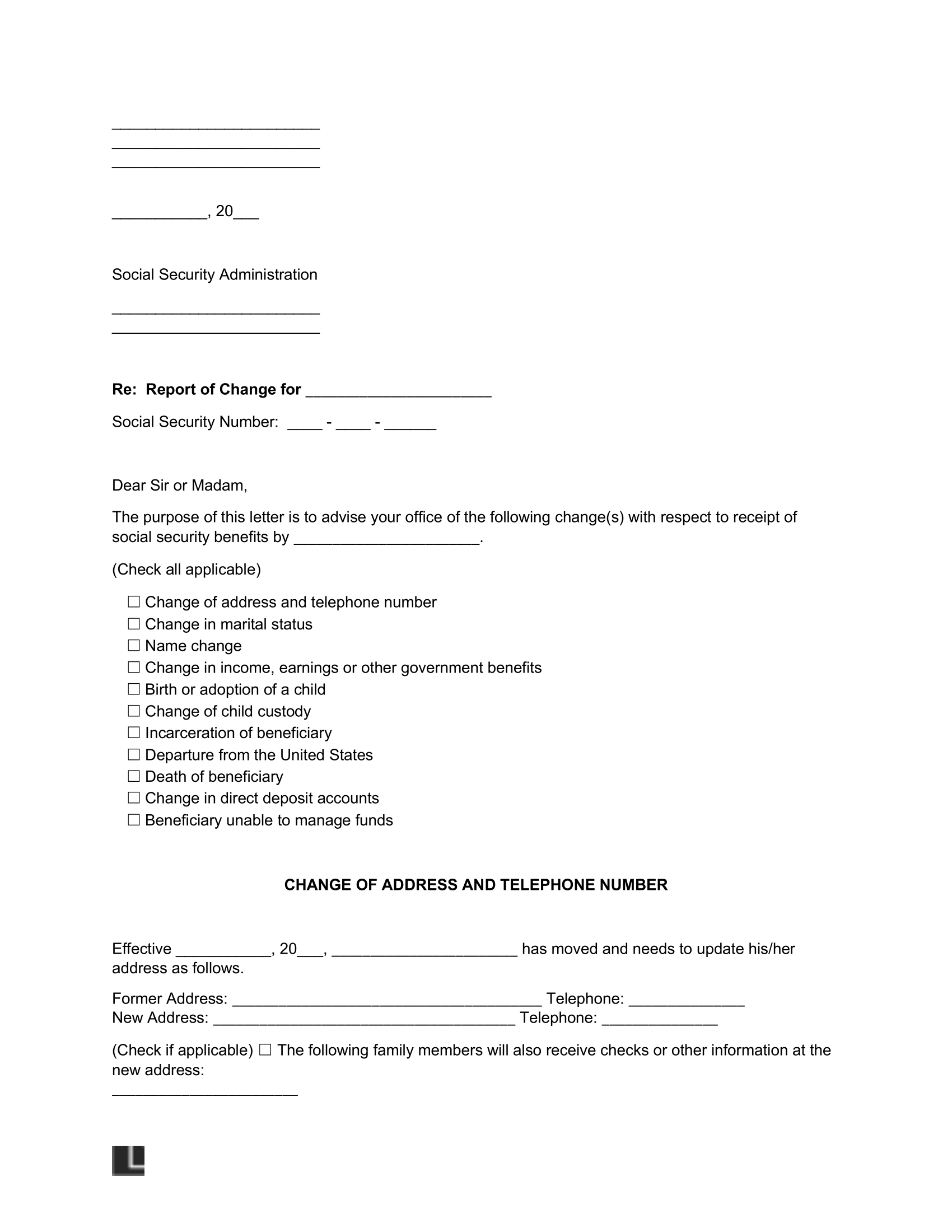
You will need to state the type of change you are requesting on the form. Using Legal Templates’s form helps you speed up this process by letting you check the type you want to report, such as:
- Change of address or phone number
- Change in marital status
- Name change
- Change in income, earnings, or other government benefits
- Birth or adoption of a child
- Incarceration of the beneficiary
- Departure from the United States
- Death of a beneficiary
- Change in direct deposit accounts
- Cases where the beneficiary cannot manage their funds
To change direct deposit or banking information with Social Security, select the “change in direct deposit accounts” option on the form. The SSA may request additional banking information to update your payment information.
Step 5 – Include Any Required Supporting Documents
Some updates may require you to provide supporting documentation so the SSA can verify the change. If you are submitting the request on behalf of another person, the SSA may ask for proof of identity and your relationship to the beneficiary, such as a driver’s license, state ID, or passport. You may also need documents that show the change being reported. For example, a marriage certificate, divorce decree, or a court order may be required for a name change.
Sample Social Security Change in Information Form
Take a look at the sample Social Security change in information form below to understand what details you may need to gather before reporting a change to the Social Security Administration (SSA). This sample is for reference only and is not an official SSA form.
Once you’re ready, you can use our step-by-step questionnaire to organize your information and download it in PDF or Word format. Then, use that information to complete the appropriate SSA process.